
What is a Webhook?
A webhook is a way for one application to send real-time data to another whenever an event happens. Instead of manually checking or pulling data, webhooks automatically push updates to your chosen endpoint.
Creating an API on Your Website
To receive articles or blog posts from Affpilot through a webhook, you need to create an API endpoint on your website. This endpoint should accept HTTP POST requests, validate the incoming data, and then publish the content (e.g., as a blog/article) directly into your system.
Getting Started: Add a Webhook
Click on “Add Webhook” first.
Then a new page will be open. In there have a button “+ Add Webhook”, click there.
By clicking on “+ Add Webhook”, a new window will appear where you need to enter your website’s API information. (Your website should already have an API endpoint ready to receive the webhook payload.)

Window Fields Explained:
- Webhook Title – A name to identify your webhook (for internal use).
- Webhook URL – The API endpoint URL of your website where Affpilot will send the content.
- Categories – Choose the categories under which the content should be published. Add multiple categories by clicking the “+” icon on the right side of the input box.
- Authors – Choose the author(s) under which the content should be published. Add multiple authors by clicking the “+” icon.

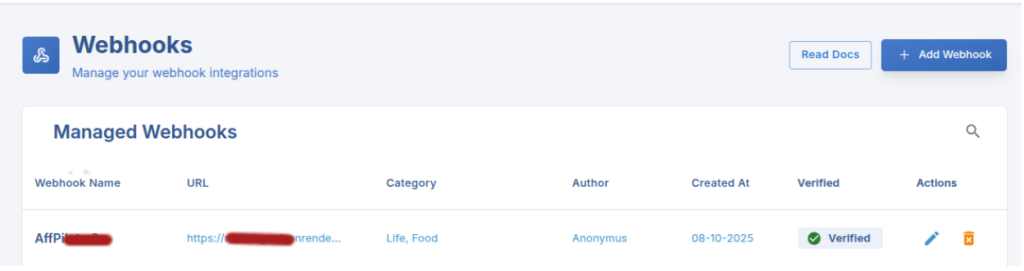
Once all fields are filled, click on “Create Webhook” to save your webhook configuration. Affpilot will then use this webhook to deliver articles or blog posts directly to your website.
After clicking “Create Webhook”, you will receive a Secret Key. This key must be included in your website’s API endpoint as a header in the following format: APIKey: ThisSecretKey
At this stage, your webhook is created but not yet verified. To complete the setup, click on the “Verify Webhook” button. Once verified, Affpilot will be able to send content securely to your website.
When verifying, you will receive an API request in the following format:
{
          "event_type": "webhook_verification",
          "created_at": "2025-09-07T09:29:53.460614+00:00",
          "author": ["Shahid", "Soyaib", "Tahsin", "Sagor"],
          "category": ["technology", "sports", "foods"],
          "content": {
                    "title": "This is for verification",
                    "content": "Ready to post in your webhook."
           }
}
Your API endpoint should be able to accept this payload and respond successfully (e.g., with a 200 OK status) to complete the webhook verification.